Themely - Icons & Widgets
- 4.8
- Rating
- 10.00M
- Installs
- Free
- Price
 Analysis by App-foxy
I approached Themely - Icons & Widgets as a personalization app rather than a simple wallpaper picker. Its appeal is easy to understand: it aims to give your phone a more deliberate visual identity through themes, icons, and widgets, instead of making you assemble everything separately. After spending time with it, I think its strongest quality is convenience. It brings several parts of a home-screen makeover into one place, which is useful when you want a noticeable change without building a design from scratch.
That convenience also deserves a careful look. Personalization apps often sit close to the parts of a phone people use every day, so I pay attention not only to how attractive the designs are, but also to what choices the app puts in front of me. Themely is free to download, carries a Teen content rating, and includes optional purchases ranging from $0.99 to $39.99 per item. That makes it approachable, but it also means I would browse first and decide later whether any paid extras are genuinely worth it.
How Themely fits into everyday phone customization
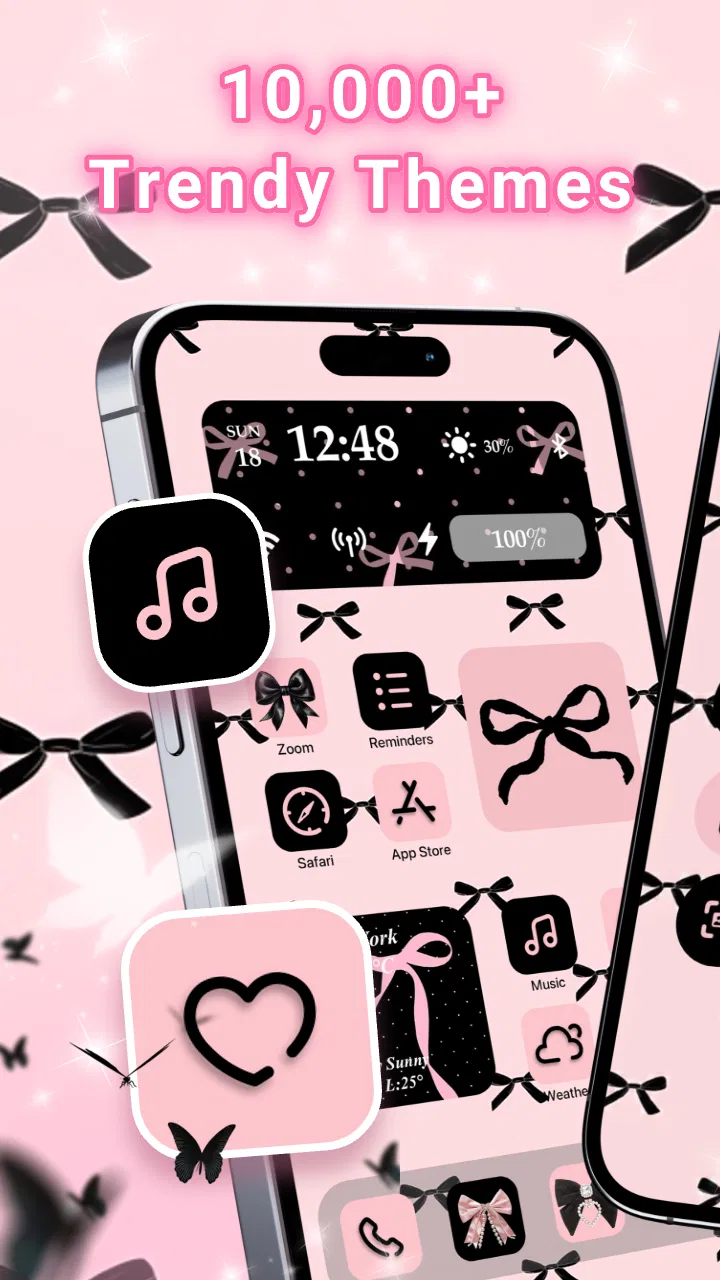
The app comes from Animoji Phone X & Emoji Maker Develop Team and is listed in the Personalization category. Its store summary points to more than 10,000 aesthetic themes and widgets, so the intended experience is clearly variety rather than a tightly curated single style. I found that important because people use customization differently: some want a soft, coordinated look, while others only need a new icon set or a widget that makes the home screen easier to read.
You May Also Like

 Blood Strike: 2.5 Anniversary
Blood Strike’s Loadouts Turn Every Drop Into a Tactical Gamble
A close look at Blood Strike’s custom loadouts: how fast access to signature weapons reshapes its battle royale rhythm, rewards preparation, and narrows the gap between fights.

 Pandora - Music & Podcasts
Pandora’s Music Is Easy to Start, but Harder to Recover
Pandora’s strength is its low-effort path from a seed to a station. Its weak spot is how much confidence it asks you to place in connection, setup, and quiet recovery.

 8 Ball Pool
 Is Built on Rivalries, Rematches, and Routine
A close look at the rivalries, rematches, shared routines, and unanswered safety questions that turn a quick pool match into a persistent mobile community.

 Samsung Music
’s Quiet Strength Is Playing What You Already Own
Its reach comes less from spectacle than from dependable access to a personal library. That simplicity is both the app’s strongest retention engine and its ceiling.

 AccuWeather: Weather Radar
AccuWeather Review: A Quick, Clear Forecast for Everyday Decisions
For everyday plans, the best forecast is the one you can understand quickly. AccuWeather makes rain timing, radar, and local conditions easy to act on, with a few trade-offs.

 Hill Climb Racing
Why Hill Climb Racing Still Turns Crashes Into One More Run
A tiny car, a bumpy hill and one more upgrade: Hill Climb Racing keeps resurfacing because its simple chaos makes every near-miss feel personal.
More From Our News Desk
View All News


Themely works best when I treat a theme as a starting point. Instead of choosing a random image and then trying to make icons match it, I can begin with an overall mood and decide how much of the design I actually want to apply. That distinction matters. A complete makeover can look impressive in a preview, but it may also make a familiar phone feel less practical. Selecting only the parts that improve the screen is often the better result.
For example, I can imagine using it before a new school term, after changing a phone case, or when I want a calmer home screen for work. A coordinated widget and icon style can make a device feel refreshed without changing the underlying apps. Someone who enjoys seasonal decoration may also appreciate being able to switch the visual theme for a short period and then return to a simpler arrangement.
The app is available at no charge, which lowers the barrier to experimenting. I would still avoid assuming that every design element is included in the free experience. Because in-app purchases are part of the model, the sensible approach is to preview several styles, test how they fit your existing layout, and only then consider spending money. This is especially important for users who want one specific look rather than a large collection.
What the design approach gets right
The biggest practical advantage is the relationship between themes, icons, and widgets. In separate apps, I often end up comparing colors manually and accepting small mismatches. Themely’s all-in-one approach reduces that work. Even when I do not use every element, starting from a related visual language helps me avoid the common problem of a beautiful wallpaper paired with icons that feel unrelated.
There is also value in having a broad selection. A large catalog can be overwhelming, but it gives the app room to serve different tastes. Someone who likes muted tones is looking for something very different from a user who wants bold, playful graphics. The right choice is not necessarily the most elaborate theme; it is the one that remains readable when the phone is used quickly.
One useful habit is to judge a theme in context instead of relying on its preview. I would check whether the widget text remains legible against the wallpaper, whether important app icons are easy to recognize, and whether the design still feels comfortable in bright and dim conditions. A theme that looks excellent in a promotional image may be less helpful when notifications, folders, and real app labels appear on top of it.
Another practical tip is to photograph or note your current home-screen arrangement before making major changes. That gives you a simple reference if you decide the new layout is attractive but less efficient. It also makes experimentation less stressful. Personalization should feel reversible, not like a project that forces you to rebuild your phone from memory.
Where the free model needs attention
The free entry point is helpful, but optional purchases can change how freely I explore. If a preview shows a style I like and the final elements are reserved for purchase, the decision becomes less about design and more about value. I would compare several themes before paying, particularly because a single widget or icon style may not justify the higher end of the listed purchase range for someone who changes layouts only occasionally.
I also recommend checking the final appearance of a theme before applying it broadly. A complete set may look consistent, yet some of the apps I use most could become harder to identify. This is a common trade-off with decorative icon packs: visual unity improves, but recognition based on the original app symbol can weaken. For a busy phone, I would keep the most frequently used apps in a familiar position and customize less important pages more aggressively.
That workflow gives Themely a more useful role than a one-click makeover. I would use the first page for speed and clarity, then reserve a second page for the more expressive design. This lets the app deliver the aesthetic change without making essential actions slower. It is a small adjustment, but it separates a practical customization from a layout that only looks good in a screenshot.
Trust, controls, and decisions worth making before customizing
Themely has an average rating of 4.8 from around 147 thousand ratings, with roughly 2.4 thousand written reviews, and it has passed 5 million installs. Those figures suggest that many people are willing to try it, but popularity is not a substitute for checking whether the app fits my own comfort level. I would still review the choices shown during setup, examine any permission prompts carefully, and read the purchase screen before confirming anything.
The most responsible way to use a personalization app is to separate what I want from what the app asks me to allow. If a feature works without a particular permission, I prefer leaving that permission disabled. If the operating system presents a clear explanation, I read it rather than tapping through automatically. This is not unique to Themely; it is simply good practice for any app that becomes part of a daily device routine.
I also pay attention to account controls and cancellation paths whenever an app offers optional paid content. The listed purchases are individual items, so I would verify the wording on each purchase screen and use the platform’s normal purchase-management tools afterward. Keeping receipts and checking the transaction confirmation is a sensible habit, especially when experimenting with several designs in one sitting.
Data-sensitive moments can occur even in an app whose purpose is visual. The moments I would treat most carefully are first launch, permission requests, sign-in screens if shown, and any action that asks me to import or share something from the phone. I would avoid granting access simply because it makes setup feel faster. A good customization experience should still leave me comfortable with every choice I make along the way.
My preference is to test the app in stages. I would first browse the available styles, then apply one limited change, such as a widget or a secondary home-screen page. After using the phone normally, I could decide whether the design improves the experience. This staged method gives me a chance to notice unwanted friction before committing more time or money.
The release information places the app on the newer side, with a release date of May 30, 2025, and the current version shown as 1.0.0.446. It supports devices running Android 7.0 or later. For me, the Android requirement is generous enough to cover many older phones, but I would still keep expectations realistic on aging hardware. A compatible operating system does not automatically mean every visual effect or widget will behave identically across manufacturers and launchers.
That compatibility question is one reason I would not reorganize my entire phone immediately. I would check how the chosen elements behave with my existing launcher, screen size, and icon arrangement. If a widget does not align well or a shortcut behaves differently from the original app icon, I would remove that part rather than forcing the whole theme to stay.
How much control does the user really keep?
The strongest user-control strategy here is selective adoption. I do not need to accept a complete package just because I like its color palette. I can use the theme as inspiration, keep the wallpaper, replace only a few icons, or use a widget on a separate page. That flexibility makes the app more suitable for people who want personality without losing the familiar structure of their phone.
I would also keep a simple record of the original arrangement. A screenshot of each home-screen page is enough for most users and makes it easier to reverse the experiment. This is particularly useful for families sharing setup advice, or for anyone who uses a phone for work and cannot afford to lose track of essential shortcuts.
There is a subtle trade-off between visual consistency and accessibility. A minimalist theme may reduce distraction, but low-contrast labels or decorative symbols can make navigation harder. I would prioritize readable text and recognizable placement over perfect matching. If a theme makes the phone slower to use, it has missed the point, no matter how attractive the preview looks.
The Teen rating is another reason I would be mindful of who is using the app. It is not a recommendation that every design is suitable for every child or family setting. Parents and younger users should review the visible content and purchase controls together, and adults should make sure that payment confirmation remains enabled on the device.
Who should choose Themely, and who should skip it?
I think Themely is a good fit for someone who wants a quick visual refresh and prefers browsing coordinated ideas over designing every element manually. It is also useful for users who enjoy changing their phone’s mood but do not want to collect separate wallpaper, icon, and widget tools. The broad catalog gives casual decorators and enthusiastic customizers room to approach the app at different levels.
I would be more cautious if I wanted a completely free, highly technical customization workflow with precise control over every icon and shortcut. A dedicated launcher or manually assembled icon setup may be better for that purpose. Those alternatives can require more work, but they may offer finer control and fewer compromises around how apps are arranged.
Themely is also not the best choice for someone who values a nearly untouched interface. If the phone already feels clear and efficient, adding decorative layers may create clutter rather than improvement. In that case, a single wallpaper or a built-in widget may be enough. The app’s strength is giving options, but options only help when they solve a real design problem.
For a realistic everyday scenario, I would use it on a Sunday evening to prepare a work-focused home screen. I would choose a restrained theme, place a readable widget on the first page, keep messaging, calendar, and navigation icons in their usual positions, and move decorative choices to a second page. After a day of normal use, I would remove anything that slowed me down. That process uses Themely for atmosphere while keeping the phone functional during busy moments.
My cautious verdict after weighing the trade-offs
Themely succeeds because it makes coordinated personalization feel less fragmented. Its combination of themes, icons, and widgets is more convenient than hunting through unrelated tools, and the free starting point makes experimentation accessible. I especially like the idea of using it selectively rather than treating every theme as an all-or-nothing transformation.
My reservations are practical rather than dramatic. The catalog can make choosing difficult, paid items require careful value judgments, and the final result depends on how well a theme works with the phone’s existing launcher and layout. I would also treat permission prompts, account choices, and purchase confirmations as decisions to review rather than steps to rush through.
Overall, I would recommend Themely to a friend who wants a more personal Android home screen and is comfortable comparing designs before applying them. I would suggest starting small, preserving the original layout, and judging readability after real use. With that cautious approach, the app can be a convenient creative tool instead of a source of clutter or unnecessary spending.
The app’s current version is 1.0.0.446, and its Android support begins at 7.0. Those details make it accessible to a wide range of devices, while the Teen rating and optional purchases are reminders to use the app with appropriate attention. My final view is positive but measured: Themely is most valuable when it gives me control over the makeover, rather than persuading me to apply everything at once.
FAQs for Themely - Icons & Widgets
01What is Themely - Icons & Widgets?
Themely - Icons & Widgets is a personalization app designed for Android and iOS devices. It allows users to customize their home screens with a variety of widgets and icon packs. With an intuitive interface, users can easily change the appearance of their device to match their personal style.
02How do I install icon packs using Themely?
To install icon packs in Themely, simply browse the available options within the app. Once you find a pack you like, tap on it and follow the on-screen instructions to apply it. The app will guide you through the process, ensuring your home screen gets a fresh, new look.
03Are there any costs associated with using Themely?
While Themely offers a variety of free themes and widgets, there are also premium options available for purchase. These premium items often include exclusive designs and additional customization features. Users can choose to purchase these individually or subscribe for full access.
04Is Themely compatible with all devices?
Themely is compatible with most Android and iOS devices. However, compatibility may vary depending on the device's operating system version. It's recommended to check the app's requirements in the app store before downloading to ensure it works smoothly on your device.
05Can I create my own widgets with Themely?
Yes, Themely allows users to create custom widgets. The app includes a user-friendly editor where you can design widgets to fit your preferences. You can customize aspects like colors, fonts, and sizes, giving you the ability to personalize your device even further.
Pros
- Customizable themes enhance device personalization.
- Wide range of icons for diverse styles.
- User-friendly interface simplifies navigation.
- Regular updates with fresh content.
- Widgets improve functionality and aesthetics.
Cons
- Limited free options; many require purchase.
- Occasional glitches in theme application.
- Some themes may slow down older devices.
- Ads can interrupt the customization process.
- In-app purchases can add up quickly.

Themely - Icons & Widgets
Gallery